OutboundOS is a self-hosted outbound workspace. Find or import a list, write a sequence, send from the customer’s SMTP, and handle the reply. Campaigns never leave from a shared warmup pool or from outboundos.org.
This is the Envato buyer guide. Same tokens as the rest of the product. Teal is healthy. Orange is in progress. Red blocks send. The visual contract is /design.
Getting started
You do not need to know Node to walk the product. After install, the left rail is the whole app. Click top to bottom.
- Sign in — use the owner you created on
/install, or the demo buttons on the live listing. - Dashboard — three numbers only: reply rate, positive replies, bounce. If bounce is red, stop sending.
- ICP — write who you sell to in plain language. Save. This is the brief, not a formality.
- Inboxes — Add inbox. Paste SMTP and IMAP from your host. Test send. Wait until SPF, DKIM, and DMARC are teal. Orange means still checking.
- Settings — type a street address. Launch will not unlock without it.
- Lists — New list, then Import CSV or Find leads. Open a row to edit a person. Verify until the risk chip is under 3%.
- Sequences — add an email step. Type
{{unsubscribe_url}}in the body or the sequence stays Not ready. - Campaigns — pick the list, sequence, and inbox. If Launch is locked, read the reason on the row and click through. Do not guess.
- Inbox — replies land here.
emarks interested and opens a deal.uunsubscribes. - Pipeline — drag Interested → Meeting → Won or Lost. Meeting wants a calendar URL.
Demo
Live app: webbuddy-outbound.fly.dev/login. On that box, User and Admin fill the fields in one click.
| Role | Password | Lands in | |
|---|---|---|---|
| User | demo@demo.com | demo1234 | Demo workspace — lists, campaigns, replies |
| Admin | admin@demo.com | admin1234 | Same workspace, then Open operator |
Demo data lives only on that hosted database. A buyer install starts empty.
Architecture
Two long processes, one database, one queue. The browser never talks to SMTP. Campaigns sit in Redis until the worker sends them from the customer’s inbox.
- Web — Next.js. Pages, APIs, install, billing. Run with
npm run devornpm start. - Worker —
src/workers/index.ts. Drains the send queue and polls IMAP. Runnpm run workerbeside the web process. - Postgres — workspaces, lists, campaigns, replies. Encrypted SMTP and API keys.
- Redis — BullMQ jobs. If Redis is down, nothing sends.
Branding and colors
Change look in one file: src/app/globals.css. The :root block is the brand. Do not add a second green. Teal is healthy and the only accent.
| Token | Default | Use for |
|---|---|---|
| --accent | #0E7A72 | Brand, healthy, primary buttons. |
| --attention | #D97706 | In progress, waiting on DNS. |
| --danger | #B42318 | Bounce, blocked launch, money-losing. |
| --canvas | #F7F6F3 | Page background. |
| --panel | #FFFCF8 | Tables and forms. |
| --rail | #121214 | Left navigation. |
| --ink | #1A1917 | Body text. |
Wordmark lives in src/components/icons.tsx (SealIcon). Favicon is src/app/icon.png. Account mail chrome is src/emails/ledger.tsx. After you change tokens, open /design and confirm no second palette appeared.
Annotated screens
Each shot is the live product at 1280×720. The numbered notes match the chrome on that screen.
Sign in
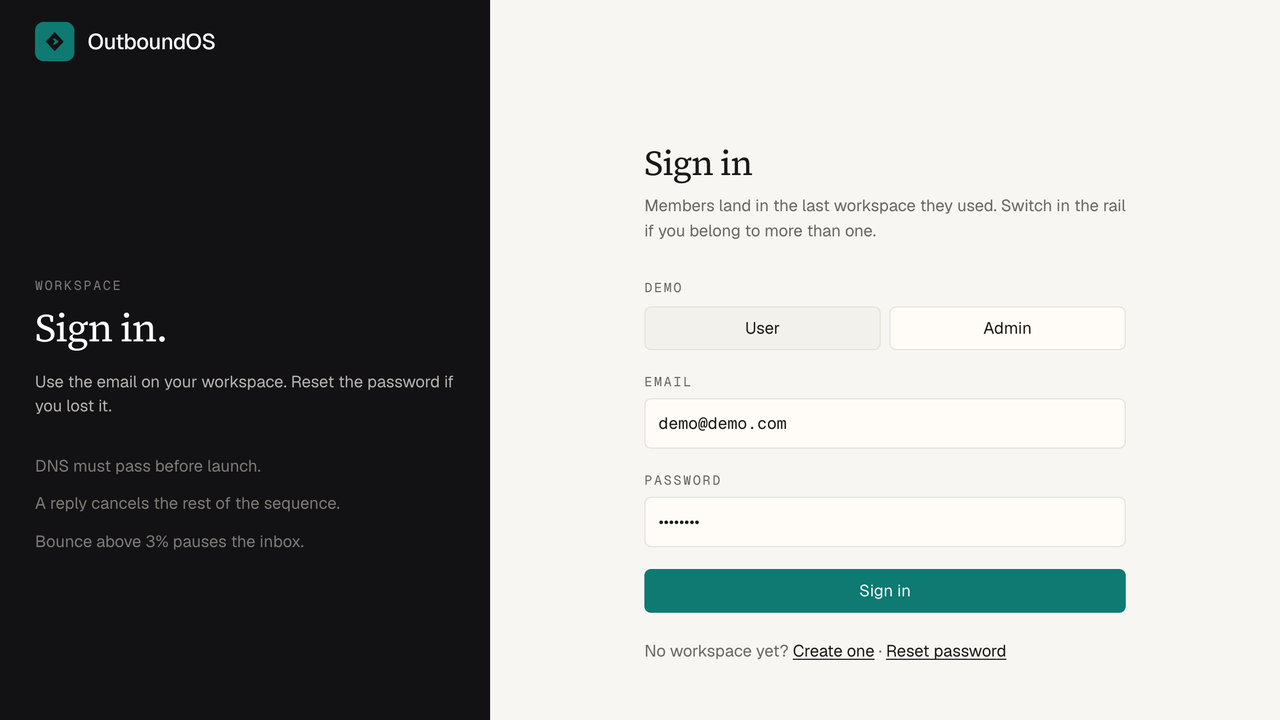
- 1 — User / Admin fill the demo fields. Hidden when DEMO_MODE is off.
- 2 — Email and password. Same form buyers see after /install.
- 3 — Create workspace / reset stay on this page.
Dashboard
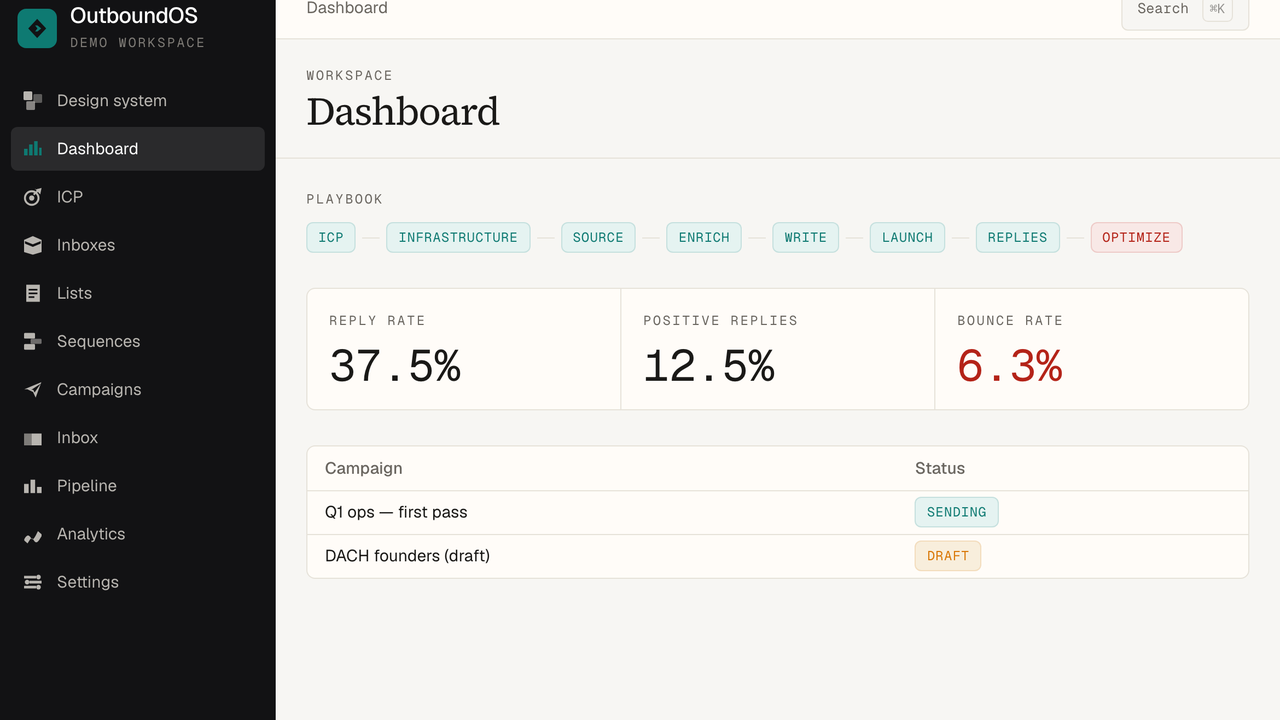
- 1 — Reply / positive / bounce. No open rate.
- 2 — Playbook chips. Red means a gate failed.
- 3 — Campaign table. Locked rows say why.
Lists
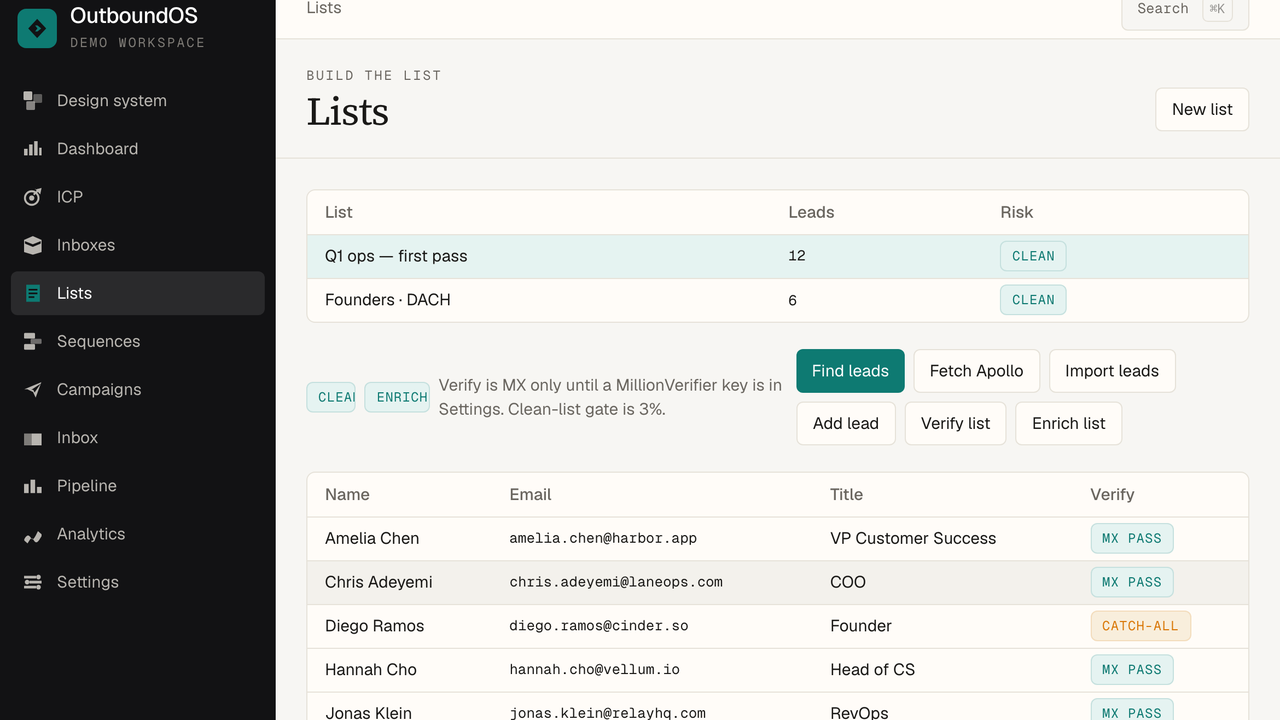
- 1 — New list, then import, find, or Apollo fetch.
- 2 — Risk chip. Over 3% and launch stays locked.
- 3 — Click a lead to edit or delete.
Sequences
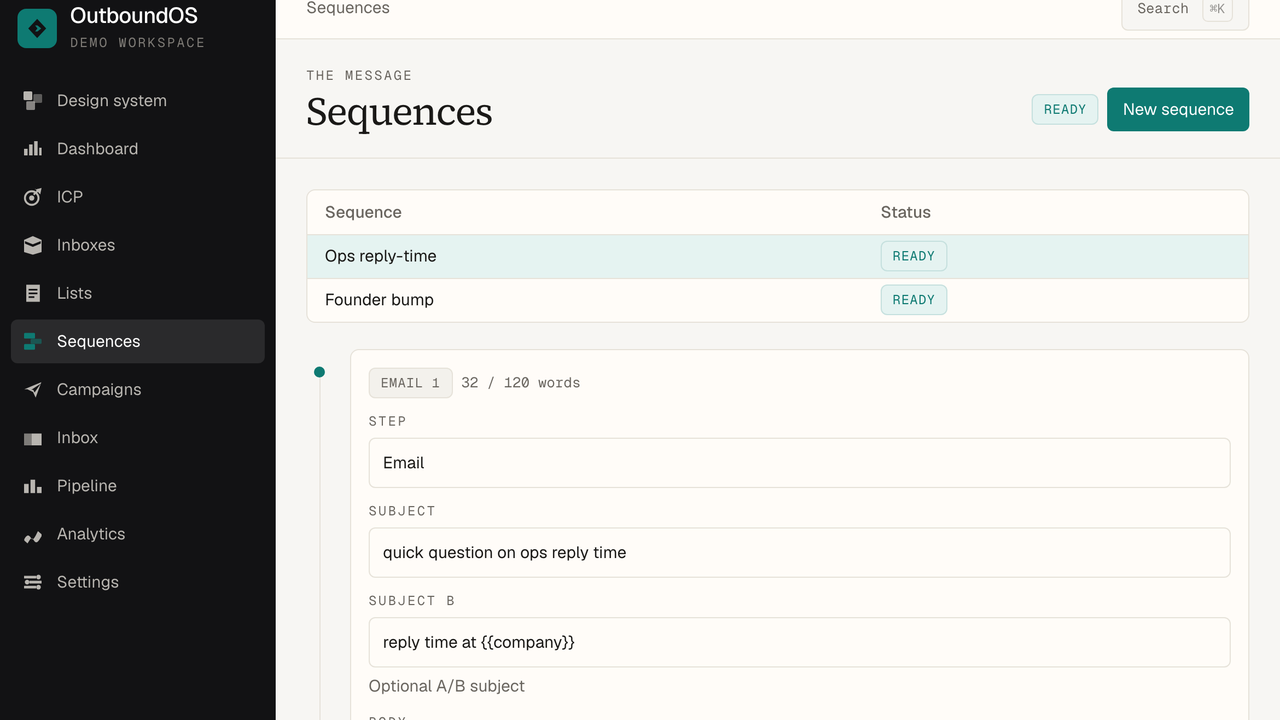
- 1 — Email and wait steps on one timeline.
- 2 — Missing {{unsubscribe_url}} keeps the sequence Not ready.
- 3 — A/B subject is optional.
Campaigns
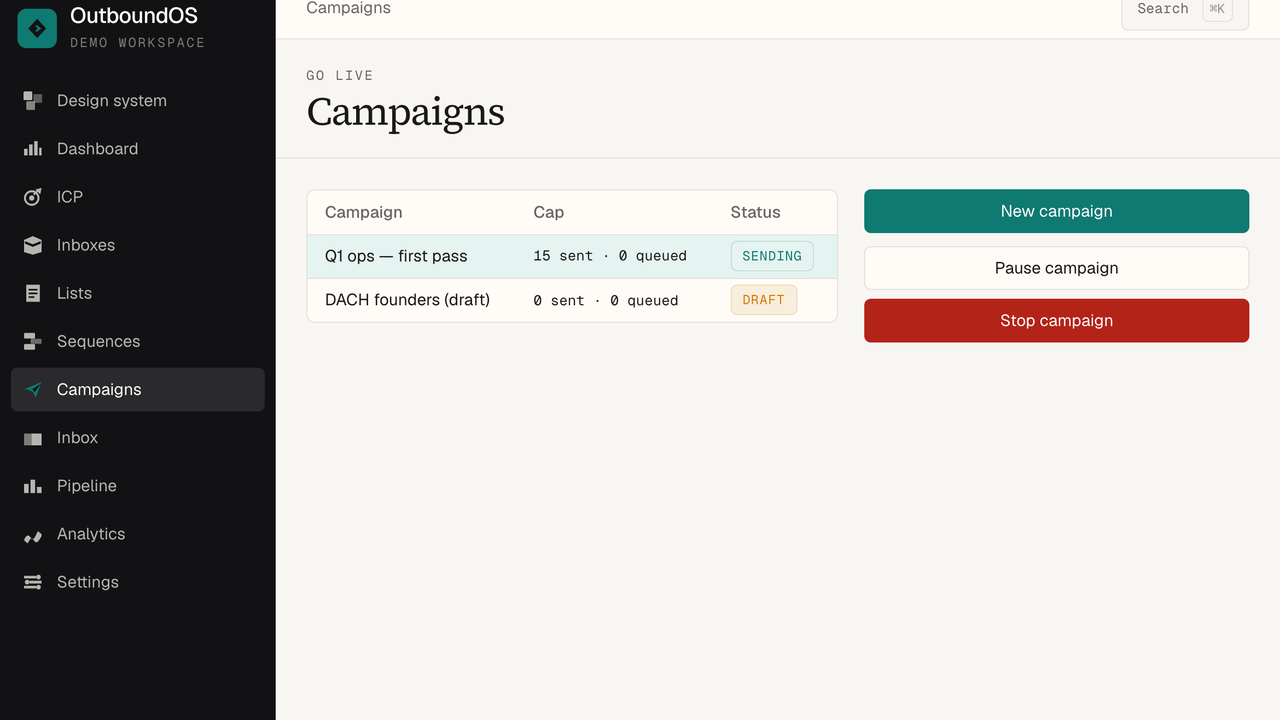
- 1 — Attach list + sequence + inbox.
- 2 — Launch lock is the next action, not a toast.
- 3 — Pause, resume, stop stay on the row.
Inbox
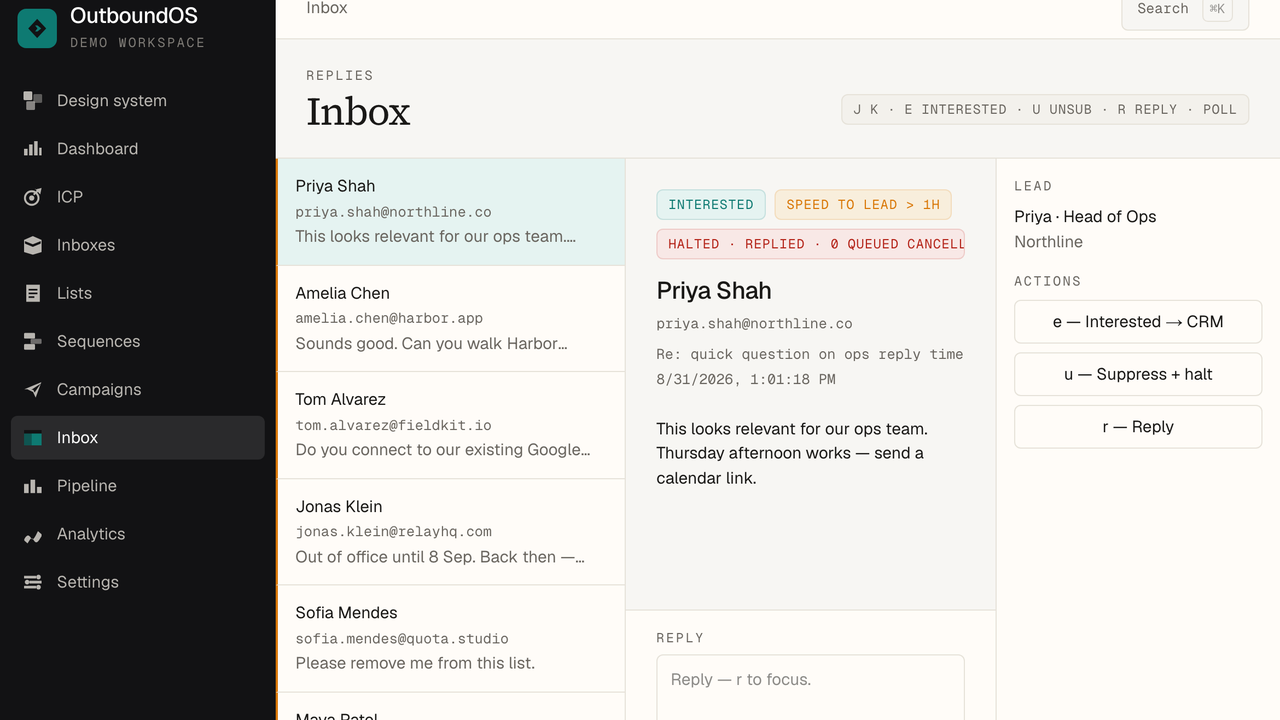
- 1 — Thread list. j / k move.
- 2 — Reply body from IMAP.
- 3 — e interested, u unsub, r reply, p poll.
Pipeline
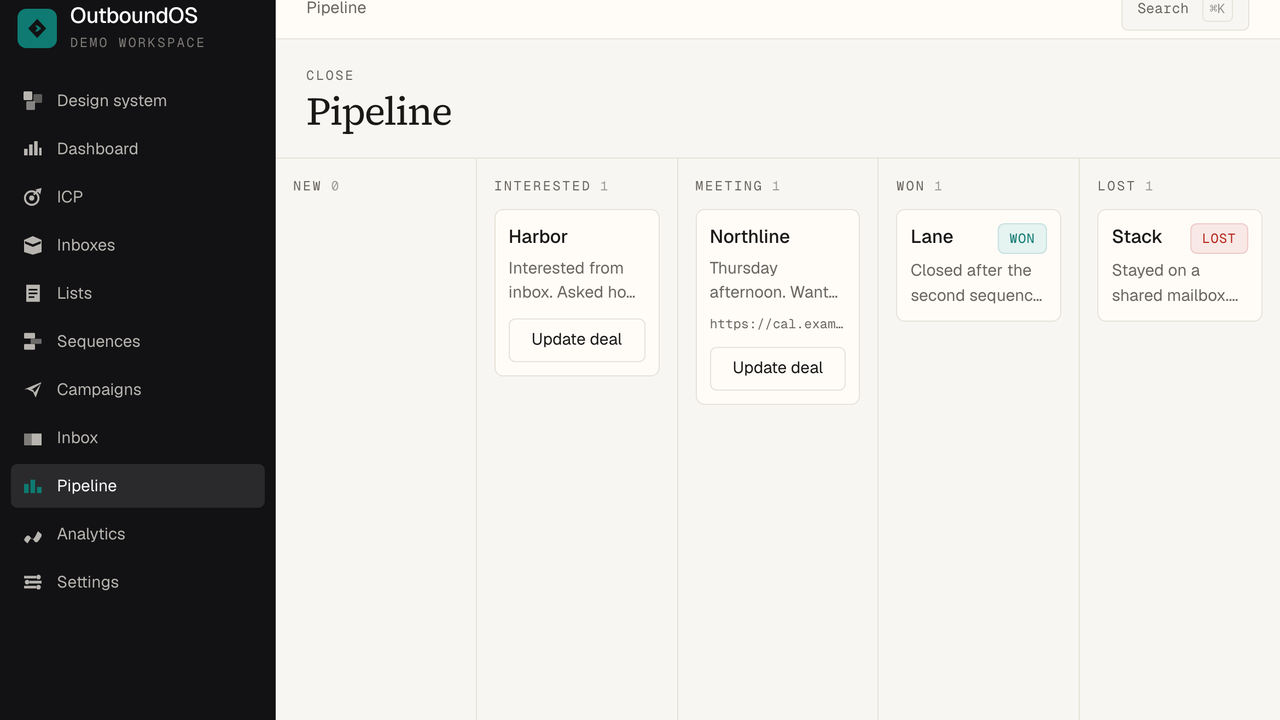
- 1 — New, Interested, Meeting, Won, Lost.
- 2 — Meeting wants a URL. Won and Lost are terminal.
Sending inboxes
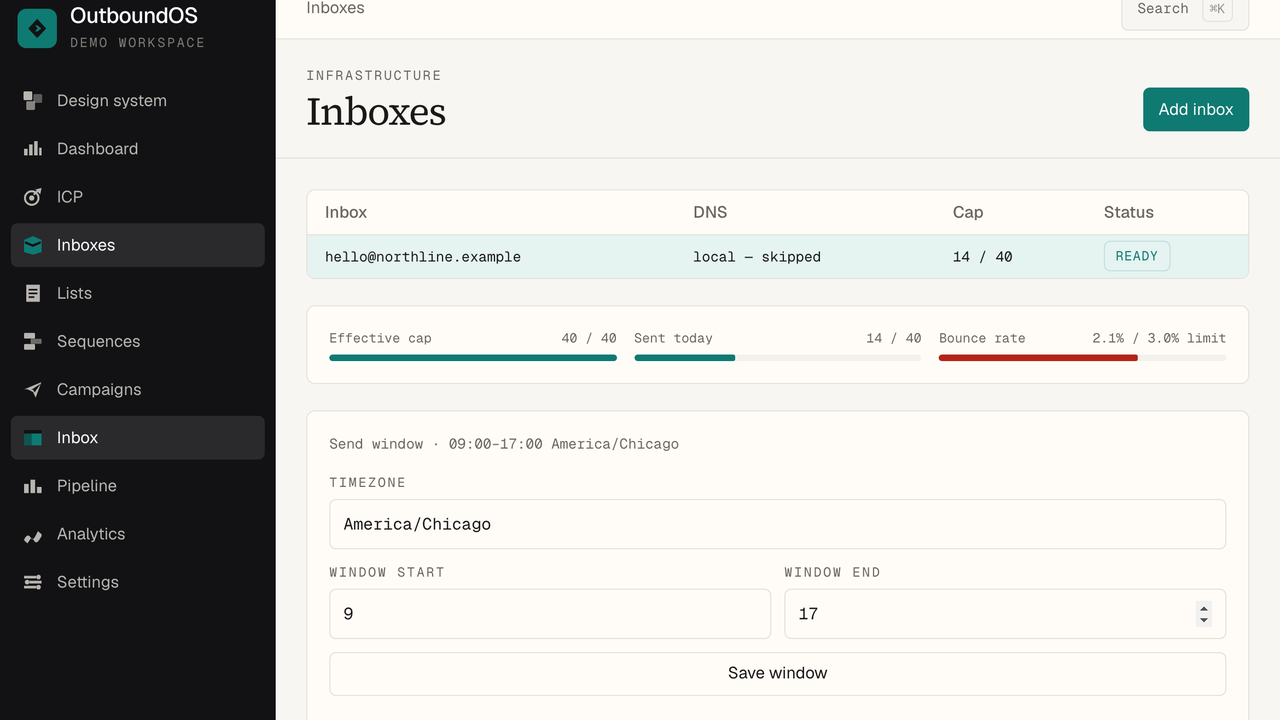
- 1 — SMTP + IMAP on the customer domain.
- 2 — DNS chips. All three must be teal before a live send.
- 3 — Bounce over 3% pauses the inbox.
Requirements
- Node.js 20 or newer
- Postgres 16
- Redis 7 (BullMQ send queue)
- SMTP + IMAP on the sending domain, or Mailpit for local
- A VPS, Fly, Railway, Docker, or similar. Not Vercel alone — the worker is a long process.
Install
cp .env.example .env
npm install
npm run infra
npm run db:push
npm run test
npm run dev
npm run worker
Open http://localhost:3000. First visit is /install — owner email, password, workspace name. Mailpit UI is http://localhost:8025. Compose Postgres is on :5433 so it does not collide with a local Postgres on 5432.
Full stack in one command: docker compose --profile full up --build
Two processes
npm run dev (or start) is the app. npm run worker sends and polls IMAP. Without the worker, campaigns queue and never leave.
First campaign
- ICP — write who you sell to. Industry, size, titles, geos, pain. This feeds find filters and first-line hints.
- Inboxes — add SMTP + IMAP. Send a test. Wait until SPF, DKIM, and DMARC pass (or use Mailpit locally, which skips DNS).
- Settings — add a postal address. CAN-SPAM requires it before launch.
- Lists — create a list. Import a CSV, find leads, or fetch Apollo. Verify. Clean risk must stay under 3%.
- Sequences — add email steps. Every body must include
{{unsubscribe_url}}. Add wait steps between sends. - Campaigns — attach list + sequence + inbox. If Launch is locked, the row says why. Fix that, then launch.
- Inbox — replies land here. Mark interested to open a deal. A reply stops remaining steps for that lead.
Environment
Copy .env.example. Never commit a real .env. Rotate AUTH_SECRET and KMS_KEY in production.
| Key | Required | Notes |
|---|---|---|
| DATABASE_URL | Yes | Postgres. Local compose uses port 5433. |
| REDIS_URL | Yes | Default redis://localhost:6379. |
| AUTH_SECRET | Yes | Long random string. Session signing. |
| KMS_KEY | Yes | Encrypts SMTP, API, and AI keys at rest. |
| APP_URL | Yes | Public origin. Unsubscribe and invite links. |
| HOSTED | No | false = /install. true = /signup, no Mailpit. |
| SUPER_ADMIN_EMAILS | No | Comma list. Those users see Open operator. |
| DEMO_MODE | No | User / Admin fill on /login. Off for buyers. |
| RESEND_API_KEY | No | Account mail: welcome, invite, reset. |
| RESEND_FROM | No | From header for account mail. |
| OPENAI_API_KEY | No | Optional first lines. Also in Settings. |
| HUNTER_API_KEY | No | Find leads. Workspace Settings override env. |
| PROSPEO_API_KEY | No | Fills Hunter misses. |
| APOLLO_API_KEY | No | Fetch search into a list. BYO key. |
| MILLIONVERIFIER_API_KEY | No | Inbox-exists verify. Else MX only. |
| STRIPE_* | No | Hosted billing only. Not needed to send. |
| MAILPIT_* | No | Local test inbox. Ignored when HOSTED=true. |
Self-host vs hosted
- HOSTED=false First visit is
/install. One owner on the box. Mailpit is allowed for test sends. This is the default buyer path. - HOSTED=true Signup creates a workspace. Shared workers, isolated data. Still their SMTP only. Plan caps can apply. Use this if you resell as SaaS (Extended license).
The loop
Six steps, in order. Skip one and launch stays locked.
- ICP — who you sell to, written down before the list exists.
- Inbox — their SMTP and IMAP. DNS must pass before the first live send.
- List — find, Apollo fetch, or CSV. Suppression survives re-import. Clean gate is 3%.
- Sequence — every email step carries
{{unsubscribe_url}}. - Launch — locked until list, sequence, and inbox are green.
- Replies — stop-on-reply cancels the rest. Interested becomes a deal.
Screens
- Dashboard
- Playbook chips, reply / positive / bounce, campaign table. No open rate.
- ICP
- Industry, size, titles, geos, pain, buying trigger. Feeds first-line hints and find filters.
- Inboxes
- Connect SMTP + IMAP. Test send. SPF, DKIM, DMARC. Ramp starts at 40/day. Bounce over 3% pauses the inbox until you clear it.
- Lists
- Create a list. Find leads (Hunter, then Prospeo), fetch Apollo, or import CSV. Edit or delete a lead. Verify. Generate first lines.
- Sequences
- Email and wait steps. A/B subject. Missing unsubscribe token = not ready. Local spam score is a hint, not a gate.
- Campaigns
- Attach list + sequence + inbox. Launch lock says why. Pause, resume, stop. Sending hours and daily cap live on the campaign.
- Inbox
- Replies from IMAP. Keys: j / k move, e interested, u unsub, r reply, p poll. A reply halts remaining sends for that lead.
- Pipeline
- New, Interested, Meeting, Won, Lost. Meeting wants a URL. Won and Lost are terminal.
- Analytics
- Reply rate, positive replies, bounce. Subject winners. Never opens. There is no tracking pixel.
- Settings
- Workspace name, postal address, AI and finder keys. Export redacts secrets. Invite teammates.
CSV import
First row is headers. One column must be a work email. Apollo, Clay, Instantly, Smartlead, HubSpot, ZoomInfo, and a plain spreadsheet all map. Sales Nav rarely has email — enrich first.
Recognised email headers include email, work email, person email. Names and company fill when present. A one-column list of addresses is also accepted. Suppressed addresses are skipped on re-import.
Email tokens
Use these in sequence bodies and subjects.
| Token | Required | Fills with |
|---|---|---|
| {{unsubscribe_url}} | Yes | One-click unsubscribe. Every email step. |
| {{first_name}} | No | Lead first name. |
| {{last_name}} | No | Lead last name. |
| {{company}} | No | Company. |
| {{title}} | No | Job title. |
| {{first_line}} | No | Generated or written opener. |
Unknown tokens render empty. Do not invent {{name}} — use {{first_name}}.
Launch gates
- DNS must pass (or local skip). Fail = red, launch locked.
- List bounce risk over 3% = not launchable.
- Every email step must include
{{unsubscribe_url}}. - Postal address is required for the compliance footer.
- Inbox paused (bounce > 3%) blocks launch until cleared.
- A reply sets halt. Remaining jobs for that lead are cancelled.
- OOO re-queues. Unsubscribe writes a suppression that survives re-import.
- Sent mail includes
List-Unsubscribe. Analytics never count opens.
Worker
npm run worker runs src/workers/index.ts. It drains the BullMQ send queue and polls IMAP. Fly and Docker start this as a second process. If Redis is down, the worker logs a connection error and nothing sends.
Optional keys
Hunter, Prospeo, Apollo, MillionVerifier, and AI keys go in Settings (encrypted with KMS_KEY) or in env. Usage is billed by those providers. CSV import, sequences, campaigns, inbox, pipeline, and analytics work with no keys.
Find order: Hunter first, Prospeo fills misses. Apollo fetch is a separate button for a BYO Apollo key. Verify without MillionVerifier is MX-only.
Operator
Add emails to SUPER_ADMIN_EMAILS. Those users see Open operator and can manage workspaces, plans, and hosted mode. On a self-hosted box, the first owner can also open the panel.
Production
Set HOSTED=true, APP_URL to the public origin, and strong AUTH_SECRET / KMS_KEY. Run web + worker against managed Postgres and Redis. fly.toml in the repo is one working shape: web process, worker process, drizzle-kit push on release.
Regular license: one end product, typically one company box. Extended license: you may offer this as a hosted service to multiple customers. See Envato’s license FAQ.
Source tree
| Path | What lives there |
|---|---|
| src/app | Routes and API. Next.js App Router. |
| src/components | Shell, marketing, and design-system primitives. |
| src/lib/domain | Launch, verify, ramp, templates. Covered by Vitest. |
| src/lib/services | Workspace-scoped reads and writes. |
| src/workers | Send queue and IMAP poller. |
| src/db | Drizzle schema. |
| src/emails | Account mail (React Email). |
| documentation | This guide, offline HTML. |
Gates live in src/lib/domain. Run npm test after you change them. Do not add a second color palette — see /design.
FAQ
- Signup says use /install
- HOSTED is false. That is correct for a self-hosted box.
- Campaign stays locked
- Read the lock. Fix DNS, list risk, unsubscribe token, or postal address.
- Nothing sends
- Is the worker up? Is Redis reachable? Is the inbox Ready, not paused?
- Find is empty
- Put a Hunter or Prospeo key in Settings. Or import a CSV.
- Verify is only MX
- Add a MillionVerifier key for inbox-exists.
- Can I send from outboundos.org?
- No. Campaigns use the inbox SMTP the workspace connected.
- Does it track opens?
- No. Replies and bounces only. There is no pixel.
- Where is the demo data on my install?
- Nowhere. Seeded data is only on the live listing demo.
Support
Item comments on CodeCanyon, for six months from purchase, as Envato requires. Include Node version, HOSTED, whether the worker is running, and the launch-lock text if send is blocked. Do not paste DATABASE_URL, KMS_KEY, or SMTP passwords.
Credits
Next.js 16, React 19, Drizzle, BullMQ, Tailwind CSS v4, Geist, Source Serif 4, Nodemailer, IMAPFlow, Zod. Optional: Hunter, Prospeo, Apollo, MillionVerifier, Resend, Stripe.
v1.0.0 — CodeCanyon release. Same product as the live demo.